See the structure your ears already hear
Drop in a Guitar Pro file or connect a tab library. RiffAtlas maps the structure, explains the hard parts, compares tracks, and helps turn the score into a practice plan.
You downloaded the tab. Now what?
You're staring at 130 bars of tablature. Some riffs repeat, some don't, and the tab doesn't tell you which. So you start at bar 1 and grind — learning bars you'll play once while missing the four-bar phrase that carries the entire song.
Hidden repetition
Most songs are 60–80% repeated patterns. Tabs don't surface that structure — they just give you a linear list of bars.
Wasted practice time
Without knowing what repeats, you spend hours on bars that only appear once — while the core riffs that define the song go unprioritized.
No big picture
You can hear the song has structure — verse, chorus, bridge — but the tab doesn't map those sections. You're navigating blind.
RiffAtlas is now an analysis, practice, and playback workspace
The original site told the pattern-map story. The current app goes further: deterministic Topology analysis, optional AI interpretation, multi-track ensemble insight, library-scale discovery, and a dedicated practice mode.
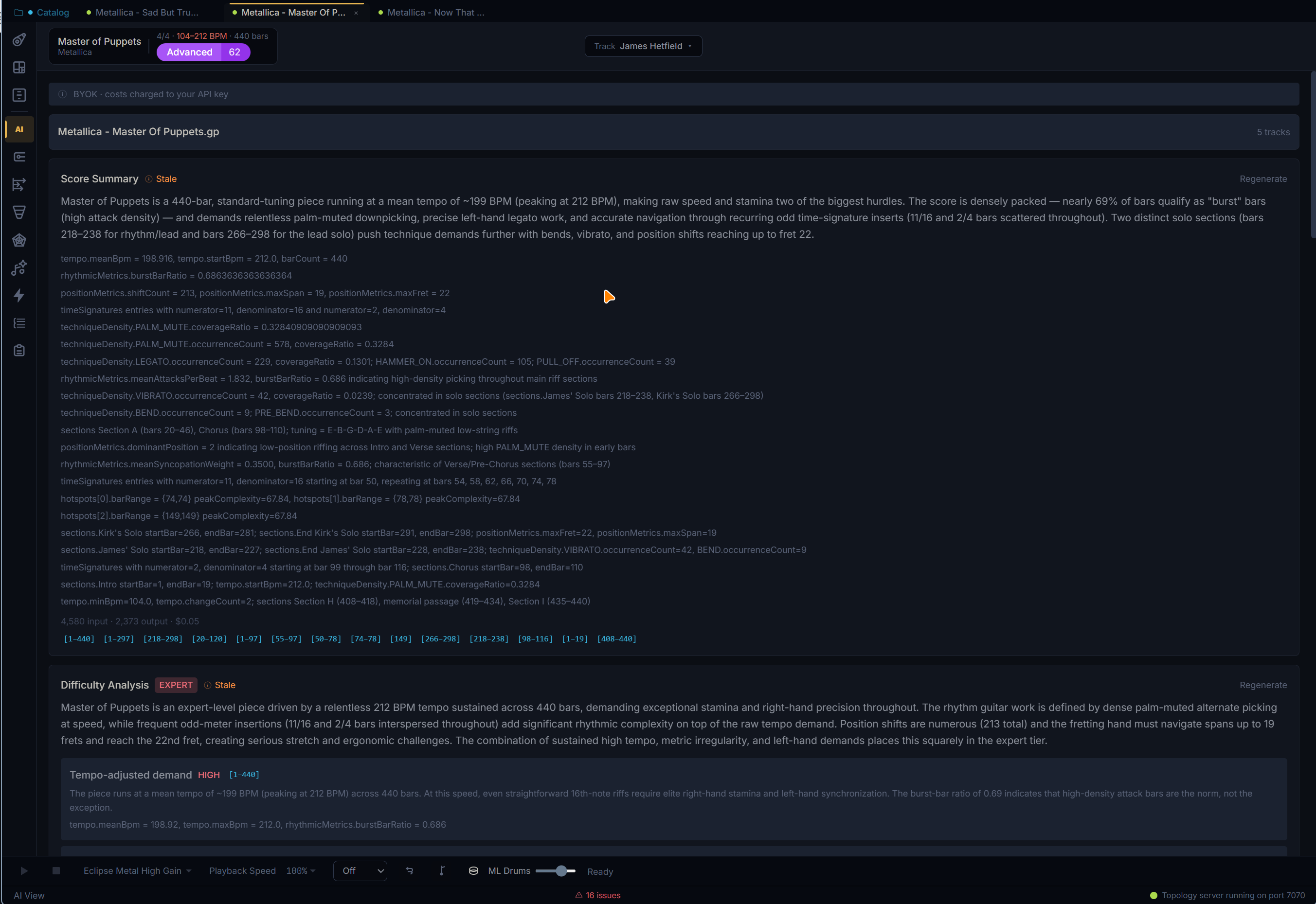
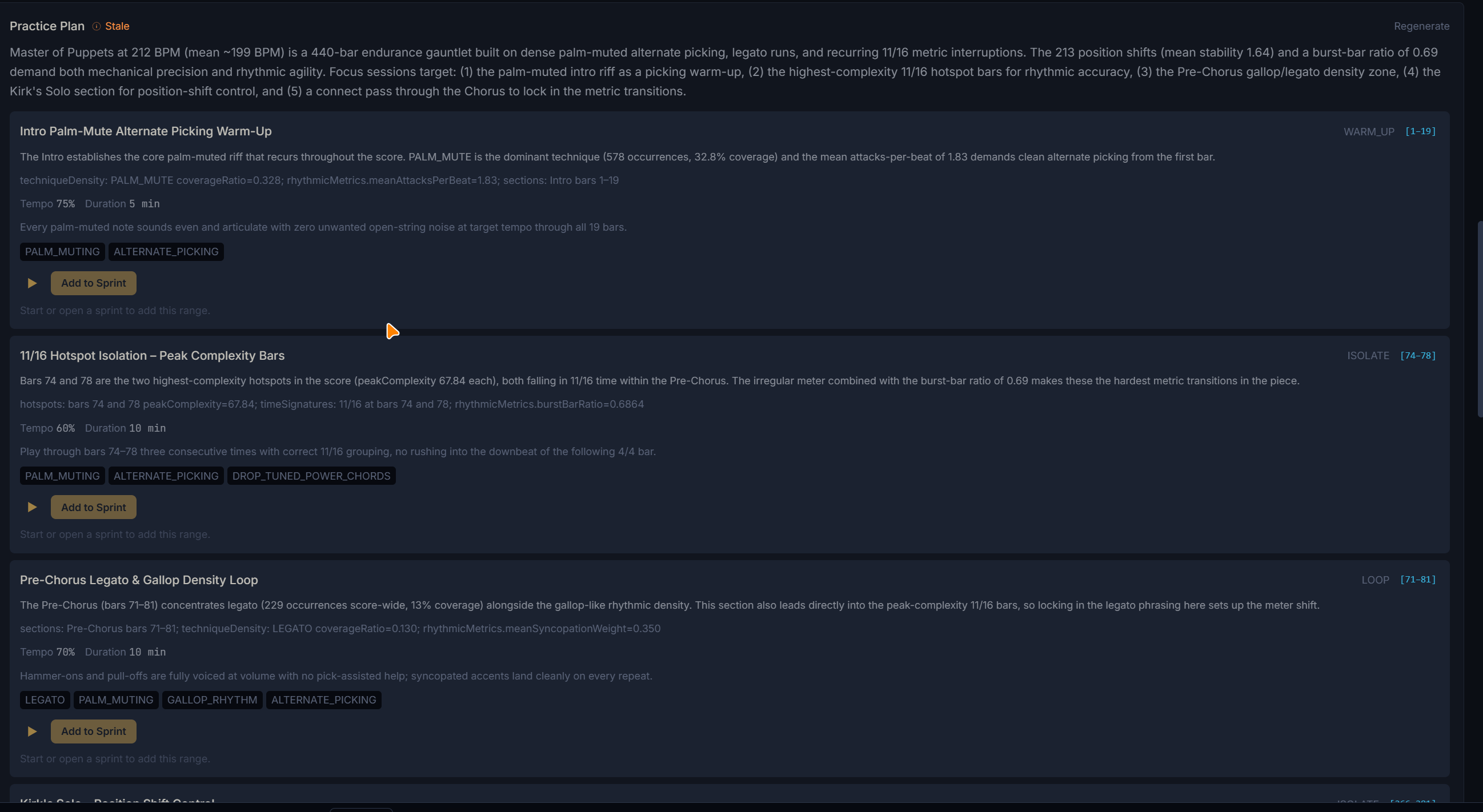
Ask for musical summaries, difficulty reads, and practice plans
Bring your own provider or local model. RiffAtlas can stream score summaries, explain difficulty concerns, tag techniques, surface hotspots, jump to referenced bars, and turn recommendations into sprint work.
- BYOK setup wizard
- Bar-linked AI evidence
- Add recommendations to Practice Mode
Turn analysis into a timed practice system
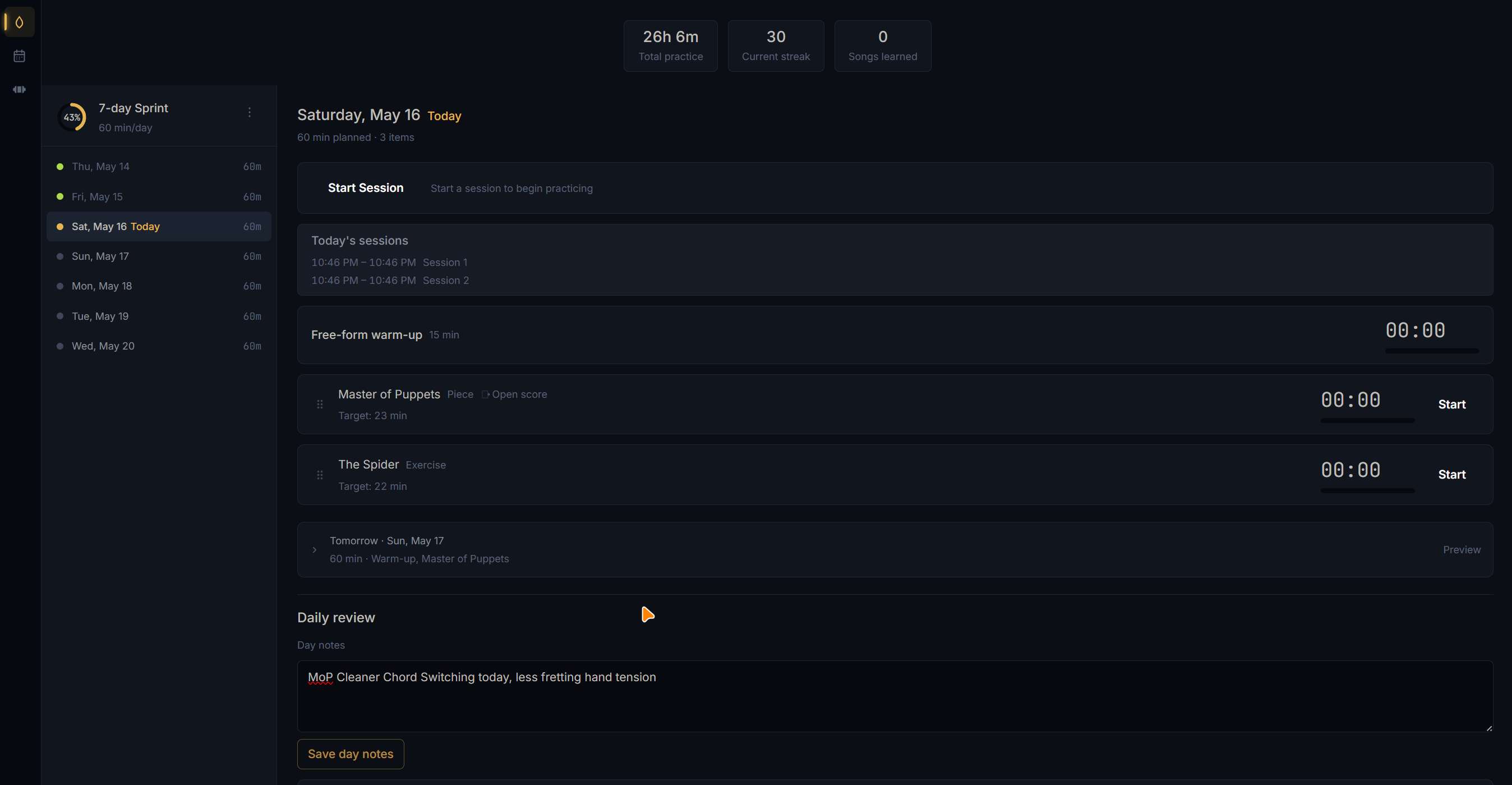
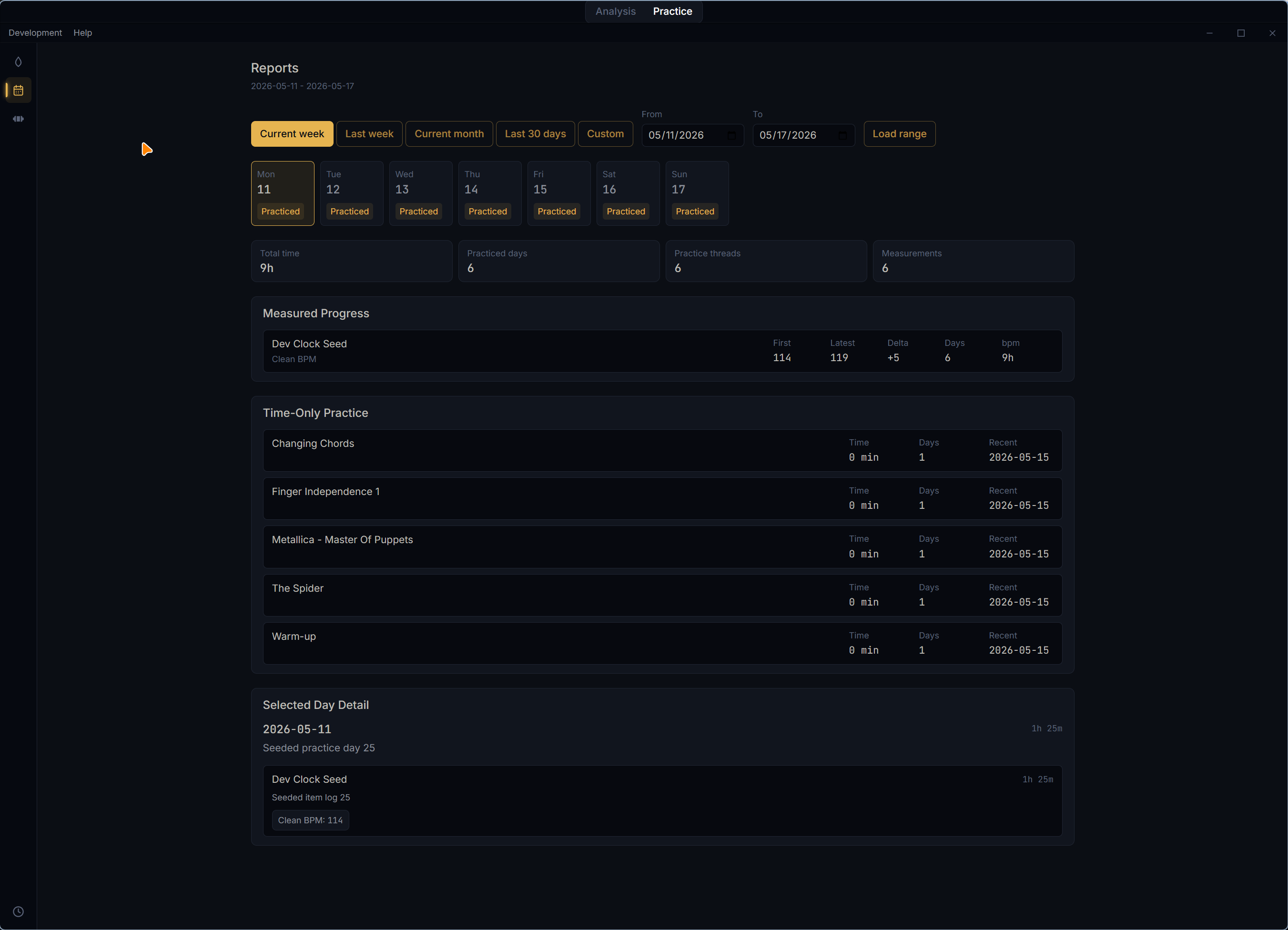
Practice Mode adds multi-day sprints, weighted skills, repertoire items, warm-ups, pre-built exercises, timed sessions, progress history, reviews, and carry-forward work for the next sprint.
- Sprint planning
- Timed daily sessions
- History and progress reports
See how the parts behave together
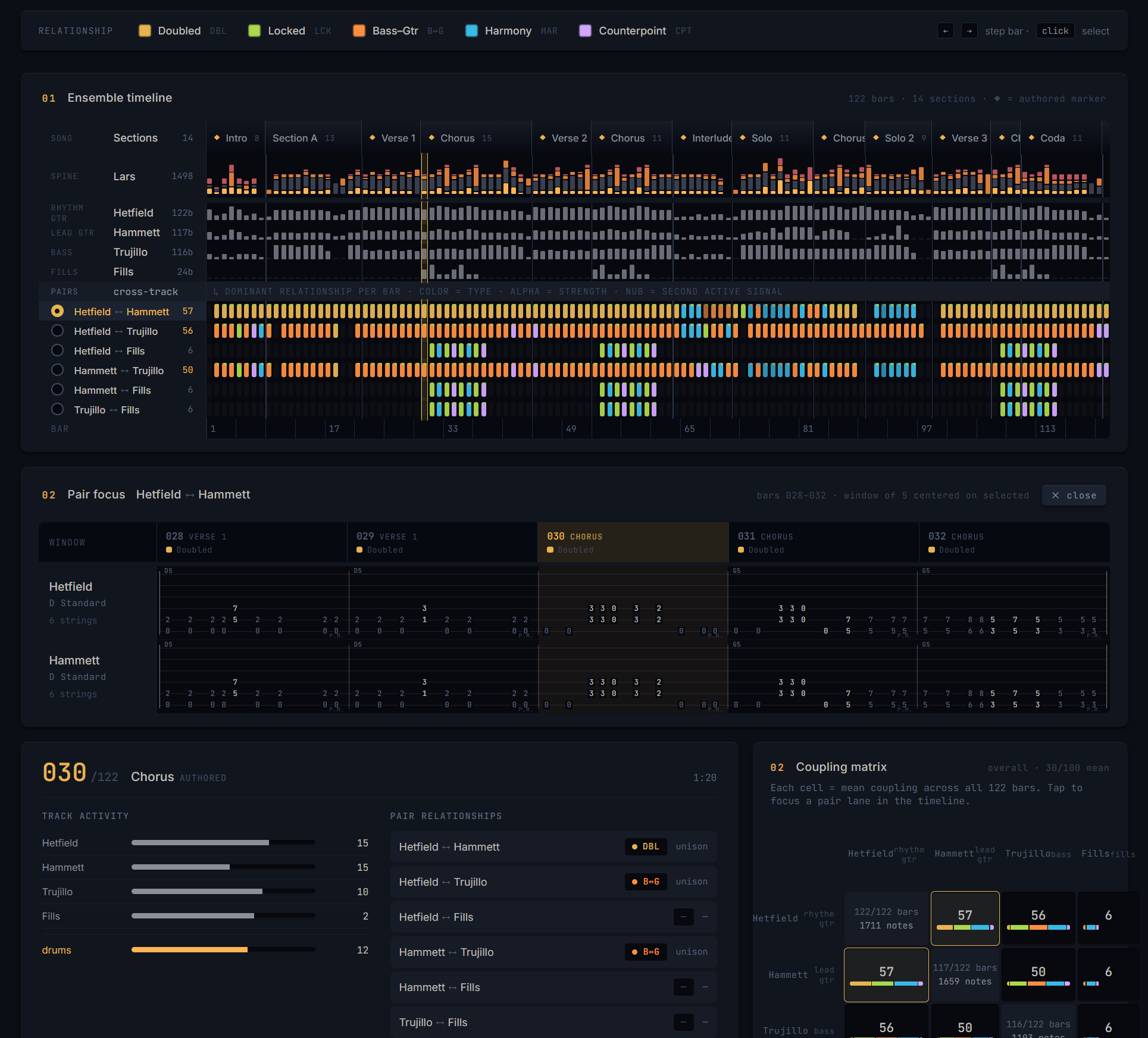
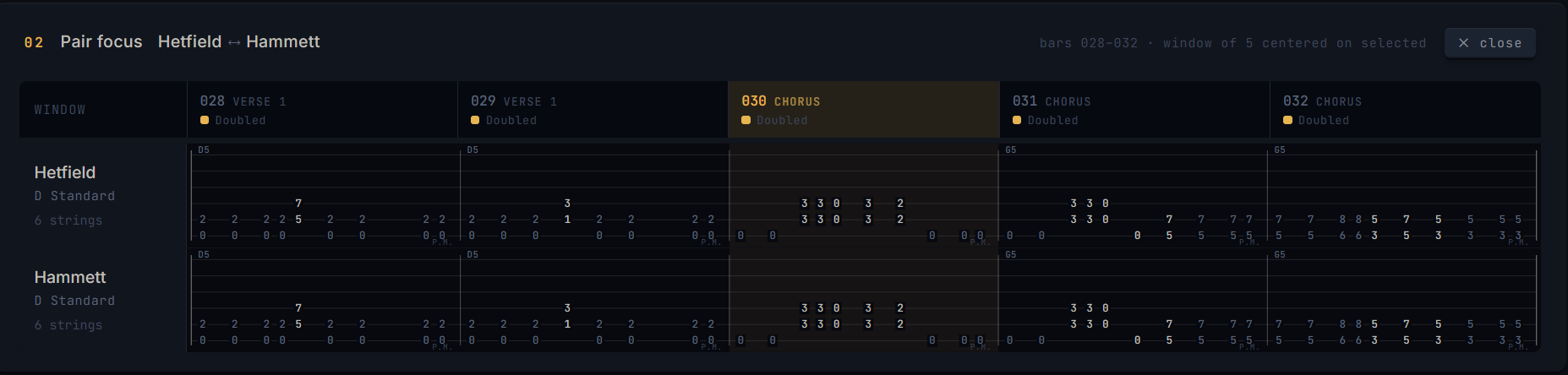
Multi-track scores can now expose cross-track relationships: doubling, harmonic intervals, rhythmic lock, counterpoint, and bass-guitar interaction across the full song timeline.
- Cross-track timeline
- Coupling matrix
- Pair focus for track comparisons

Practice with click, count-in, loops, and drum context
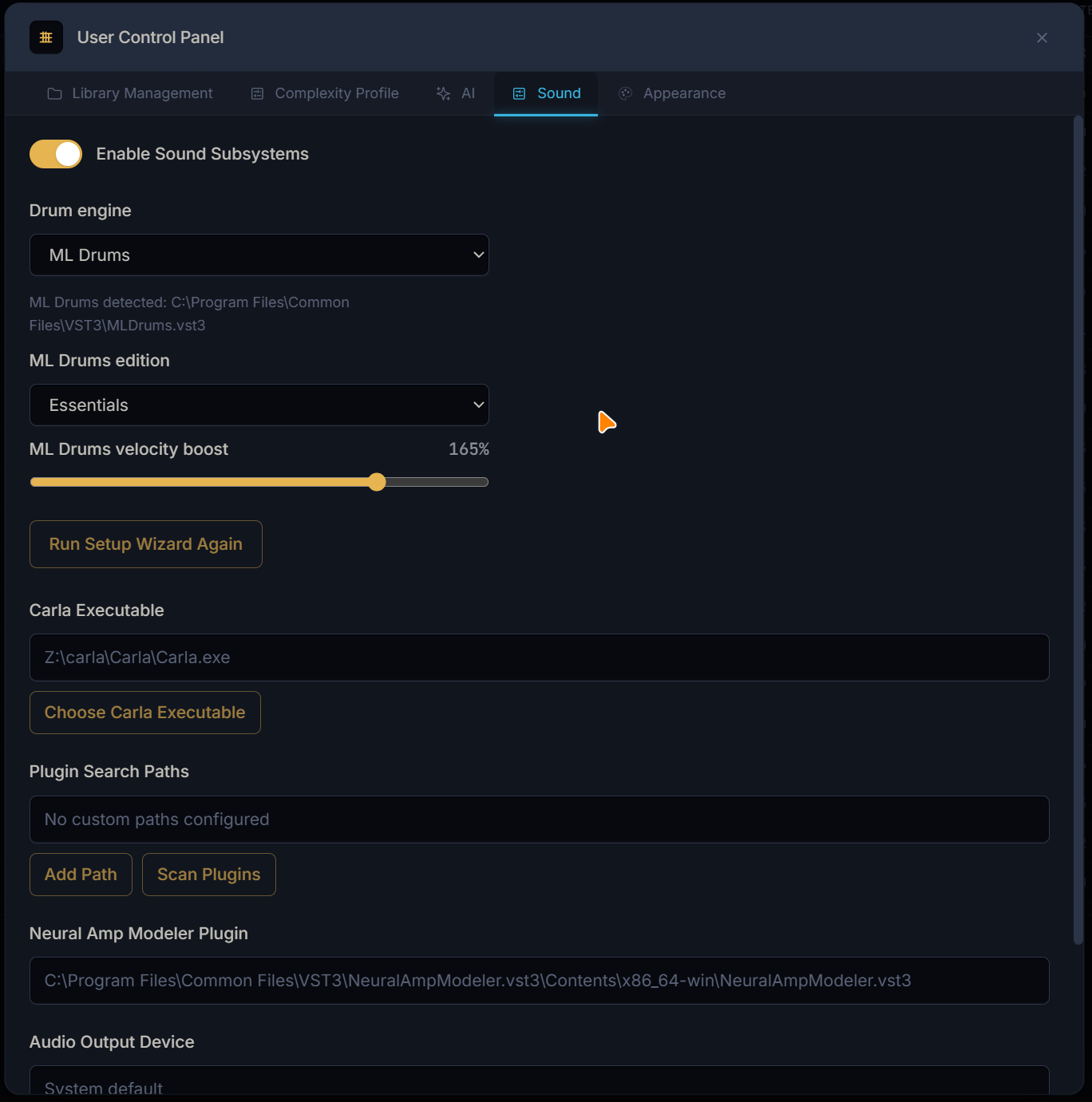
The transport has grown into a practice tool: bounded playback ranges, loop and count-in controls, click track support, catalog drum indicators, and bundled drum kits for percussion-aware scores.
- Loop and count-in
- Click track layer
- Bundled drum sample kits
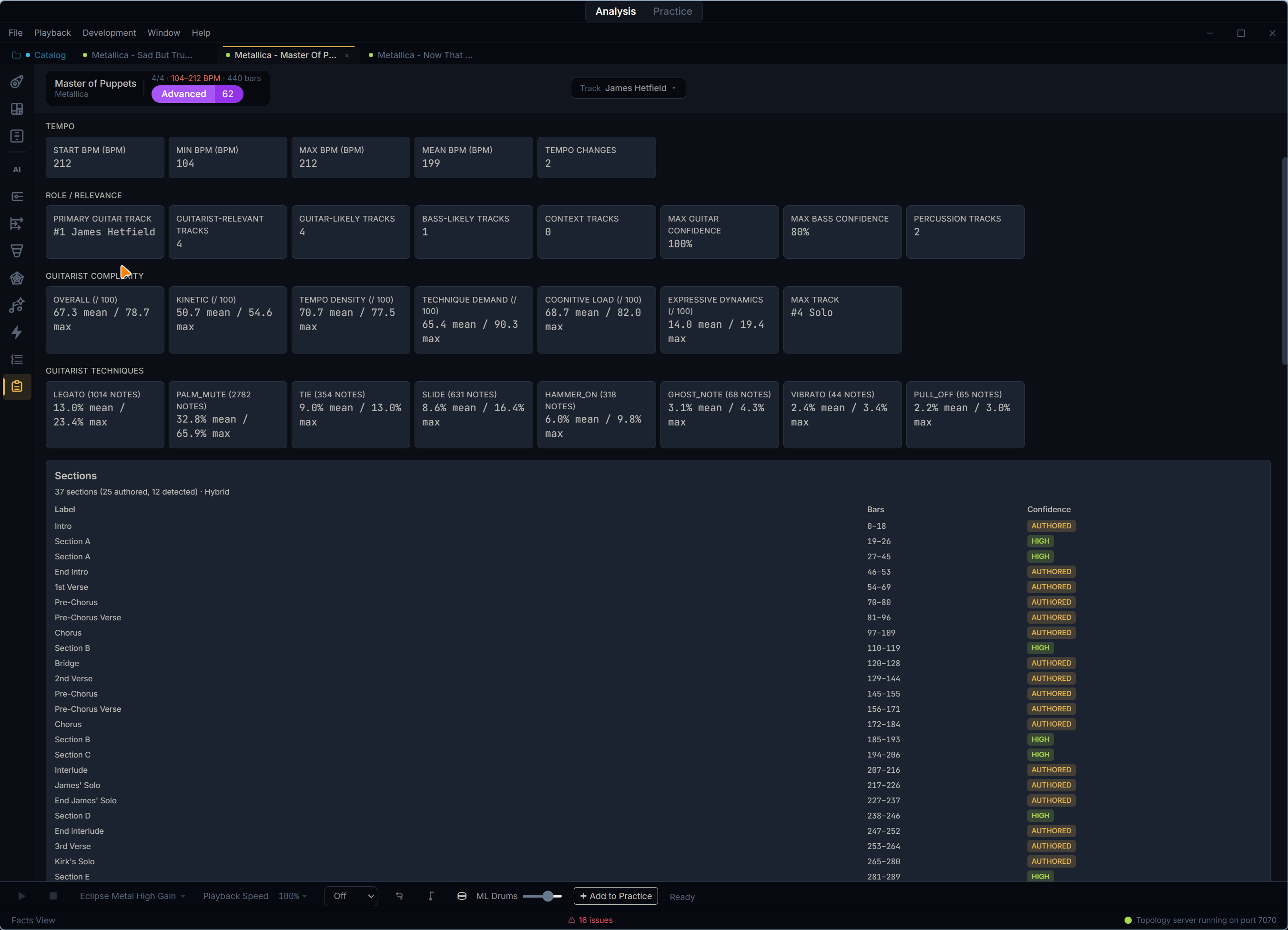
Inspect the metrics behind the analysis
Facts View gives a score-scoped inventory of the deterministic data Topology computes, from structure and tempo to rhythm intelligence, register, tension, picking, energy, and per-track facts.
- Score facts
- Track metrics
- Readable analysis inventory
More musical signals are visible in the core views
Structure and related views now surface richer harmonic and phrase context, including chord progressions, pedal and open-string usage, call-and-response, near-match diffs, and pattern relationships.
- Chord and tonal context
- Call-and-response cues
- Near-match detail
Every pattern. Every section. Every angle.
RiffAtlas brings deterministic analysis views, optional AI interpretation, catalog indexing, library statistics, tunable scoring, playback tools, and practice workflows into one desktop workspace powered by the Topology engine.
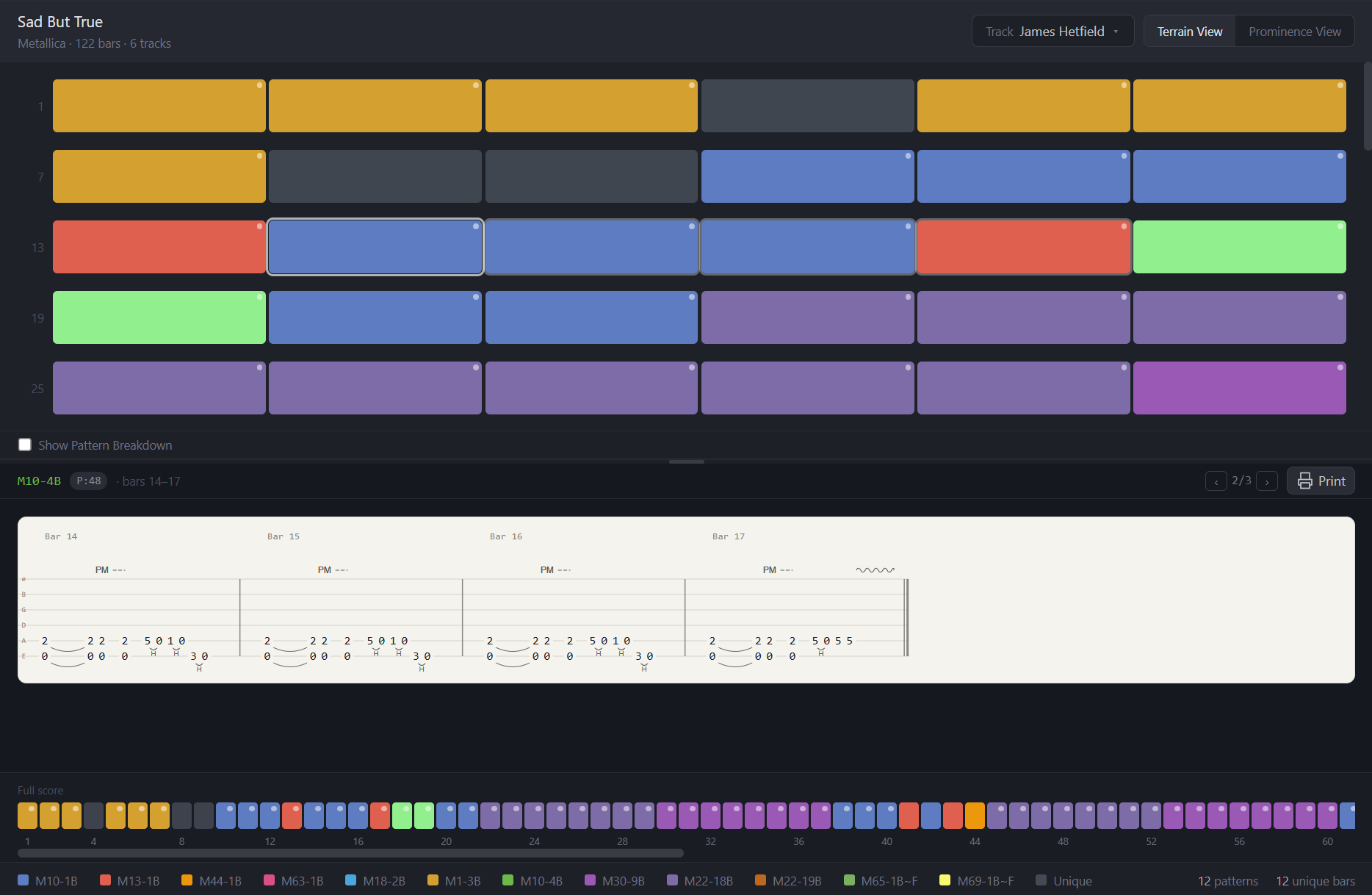
Map the whole song before you practice it
A bar-by-bar pattern map turns the score into readable terrain. Repeated riffs share colors, unique passages stand apart, and the detail pane keeps the actual tablature one click away.
- ✓ Color-coded bar grid for repeated patterns and unique bars
- ✓ Section markers, rhythm hints, hand-position cues, and modifier dots on each cell
- ✓ Relationship overlay for transposed, rhythmic-variant, motif-reuse, and near-match patterns
- ✓ Resizable notation detail pane with occurrence navigation and print report
- ✓ Full-score minimap for jumping around long files
Separate authored sections from detected structure
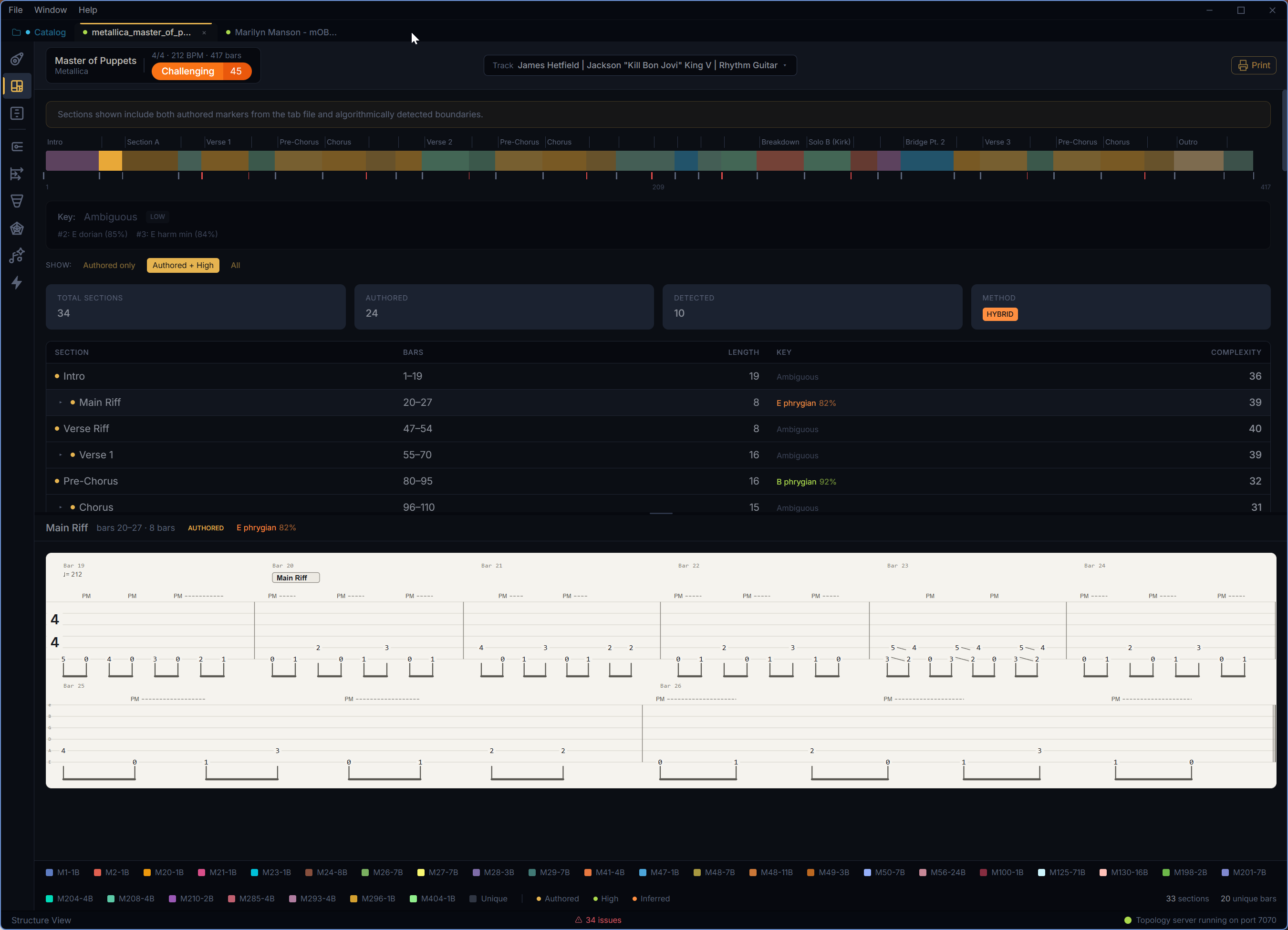
Structure View combines rehearsal marks from the file with algorithmic boundary detection, then lines those sections up against patterns, repeat markers, complexity, tonal context, and self-similarity.
- ✓ Authored, high-confidence, and inferred section filters
- ✓ Timeline strip with boundaries, pattern colors, and repeat markers
- ✓ Section table with per-section complexity and tonal badges
- ✓ Self-similarity matrix for spotting repeated formal blocks
- ✓ Resizable detail pane for the selected section notation
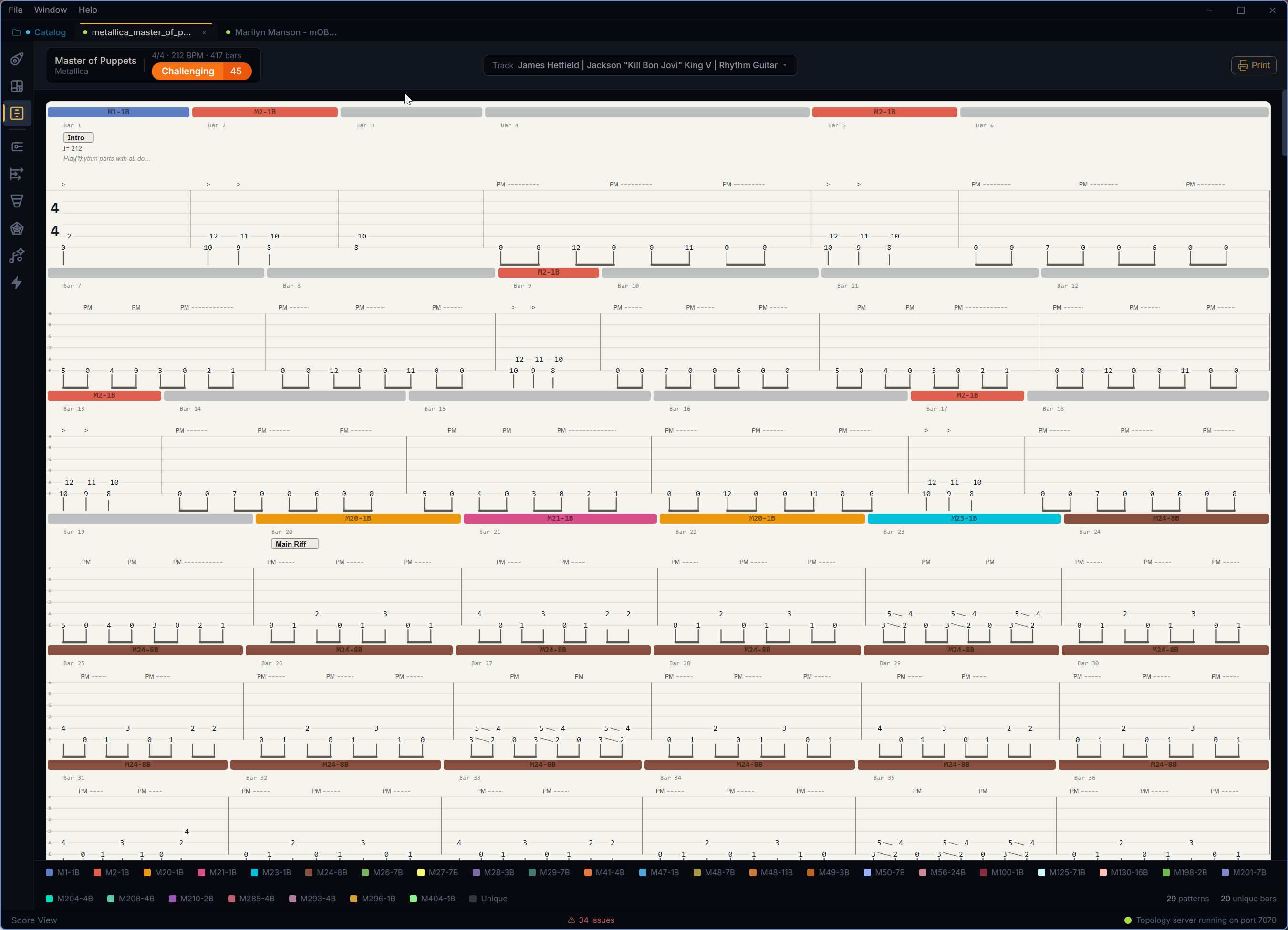
Read the full track with analysis attached
Score View keeps the normal tablature reading experience, but adds the structural context RiffAtlas found: pattern ownership, consecutive runs, repeats, and the same renderer used in printable reports.
- ✓ Full-track tablature rendered from the analyzed Guitar Pro data
- ✓ Pattern-colored strips above bars for fast cross-reference
- ✓ Repeat markers, techniques, rests, timing, and modifiers preserved
- ✓ Density-aware SVG bar rendering for screen and print
- ✓ Print the full score view when you need a practice copy
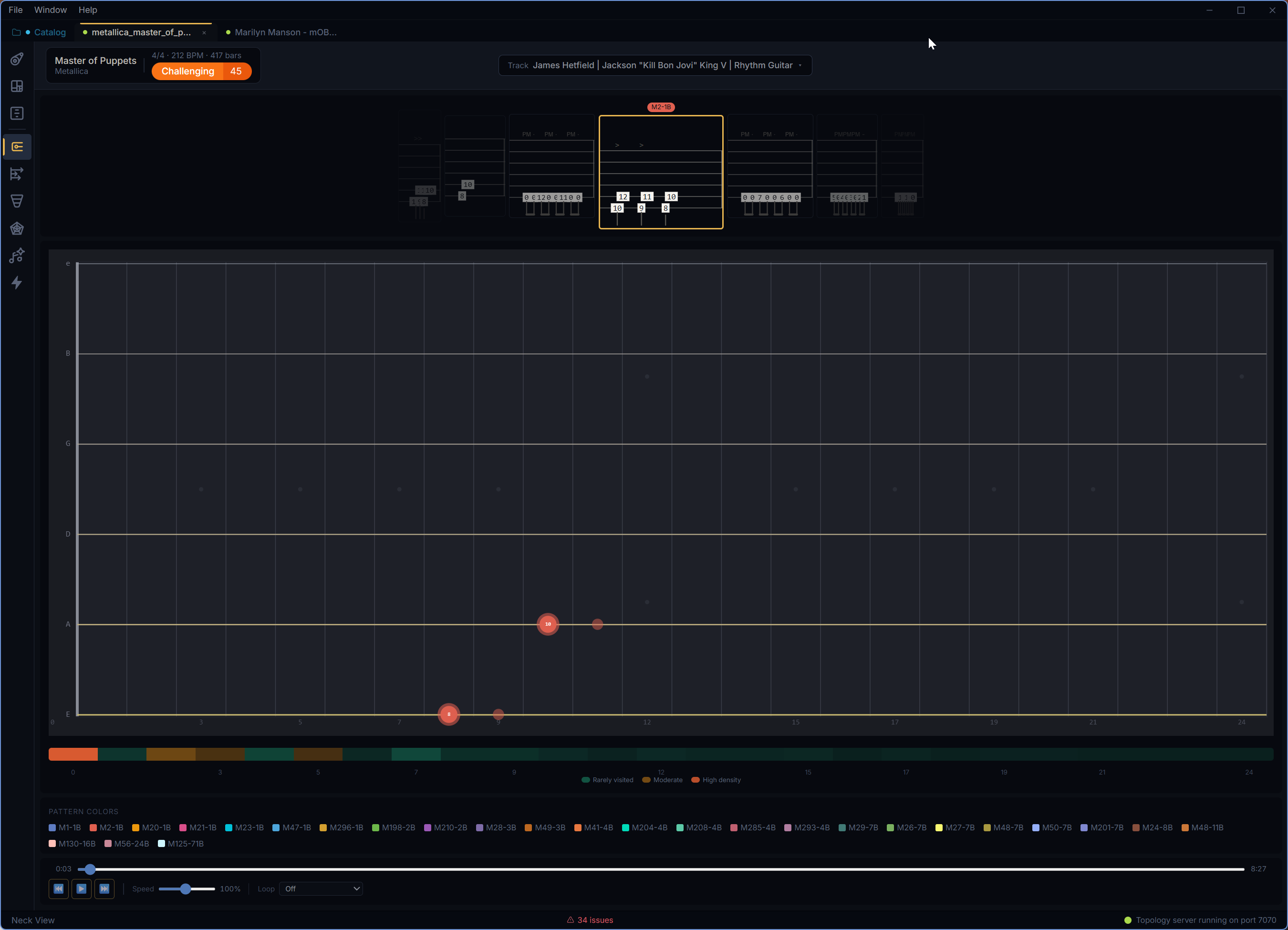
See where the riff lives on the fretboard
Neck View translates the selected pattern into fretboard motion, so position shifts, stretches, dense frets, and playback timing become visible before your hands learn them the hard way.
- ✓ Animated fretboard playback with transport controls
- ✓ Density heatmap for high-traffic fret positions
- ✓ Filmstrip view of the pattern across time
- ✓ Hand-position profile with shifts, spans, stretches, and dominant position
- ✓ Pattern colors stay aligned with the rest of the analysis workspace
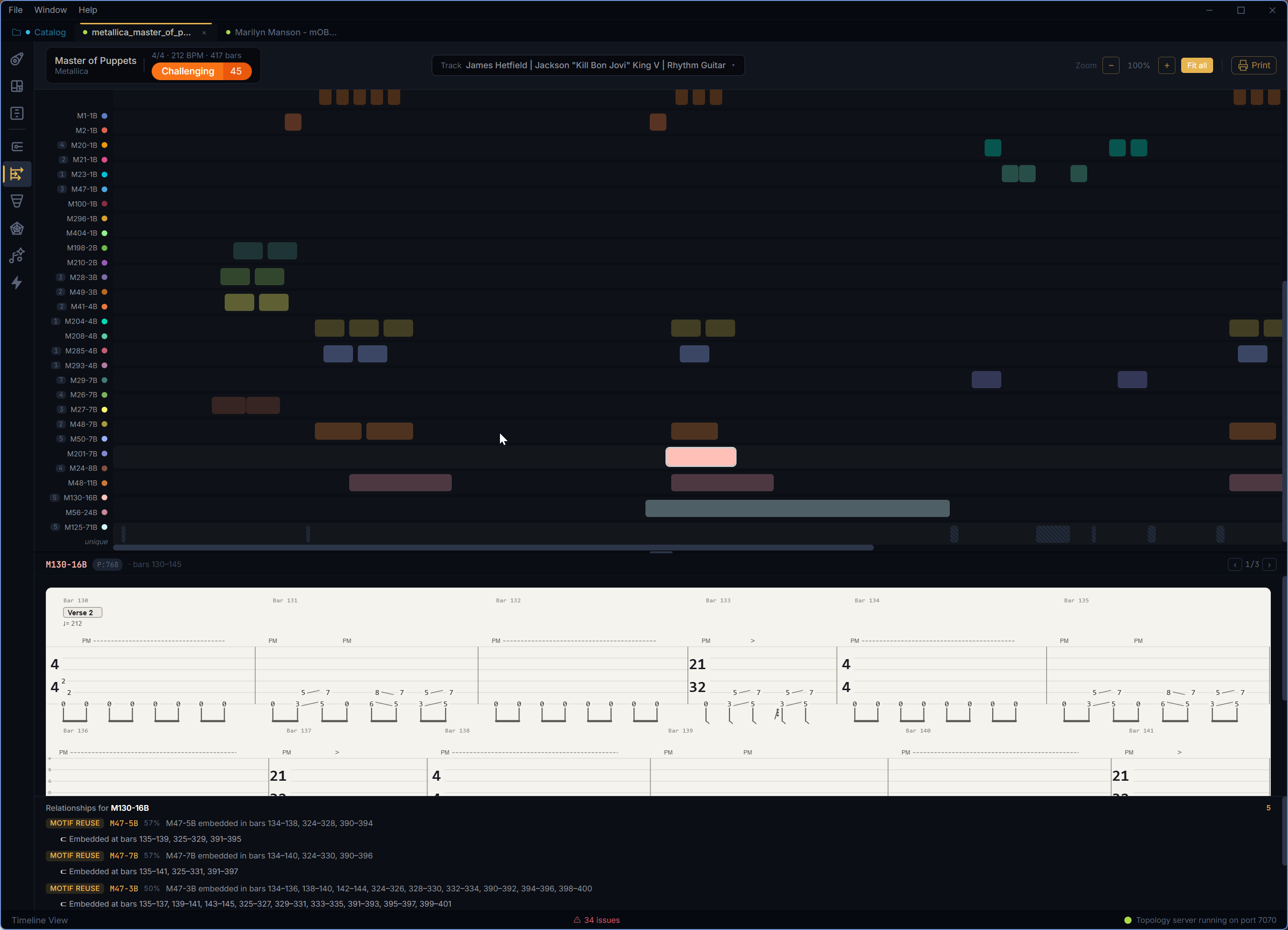
Follow every pattern occurrence in time
Timeline View lays pattern occurrences into swimlanes, making repeats, near matches, unique bars, and long-range form easier to compare than they are in linear notation alone.
- ✓ Swimlane layout for top-level pattern occurrences
- ✓ Zoom controls and fit-to-view navigation for long songs
- ✓ Unique-row treatment for bars that do not belong to a repeated pattern
- ✓ Relationship panel links related patterns from the selected occurrence
- ✓ Printable timeline pattern report
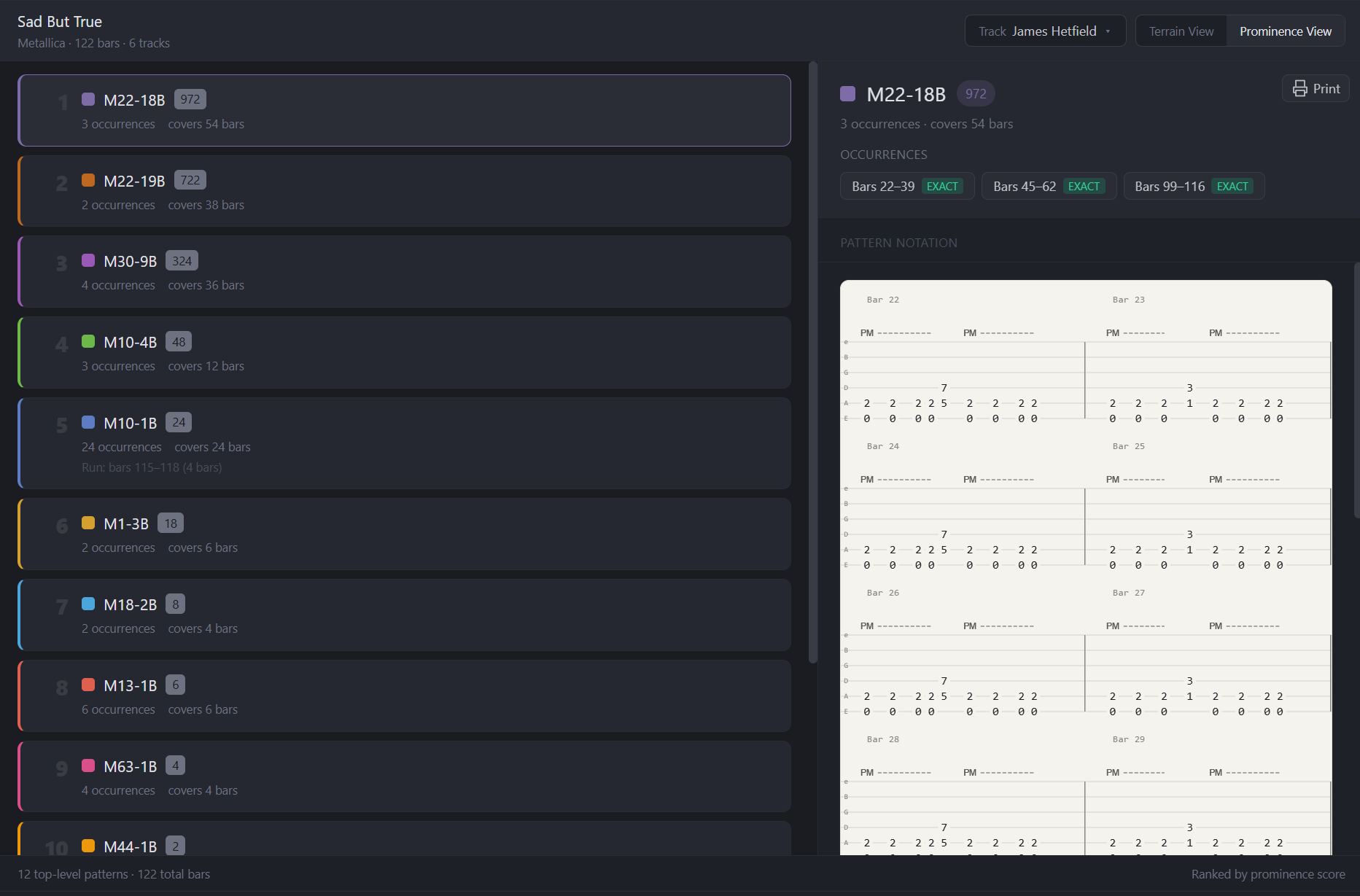
Rank the riffs by practice value
Prominence View sorts discovered patterns by coverage and granularity, helping you decide what matters first. Pattern cards now carry relationship counts, energy signatures, and picking hints where available.
- ✓ Pattern ranking by prominence score, occurrence count, and bar coverage
- ✓ Selectable checklist for building a practice plan
- ✓ Mini energy signatures and derived labels on each pattern
- ✓ Picking badges for tremolo, sweep, alternate, and cross-string demands
- ✓ Notation pane with related-pattern context and print report
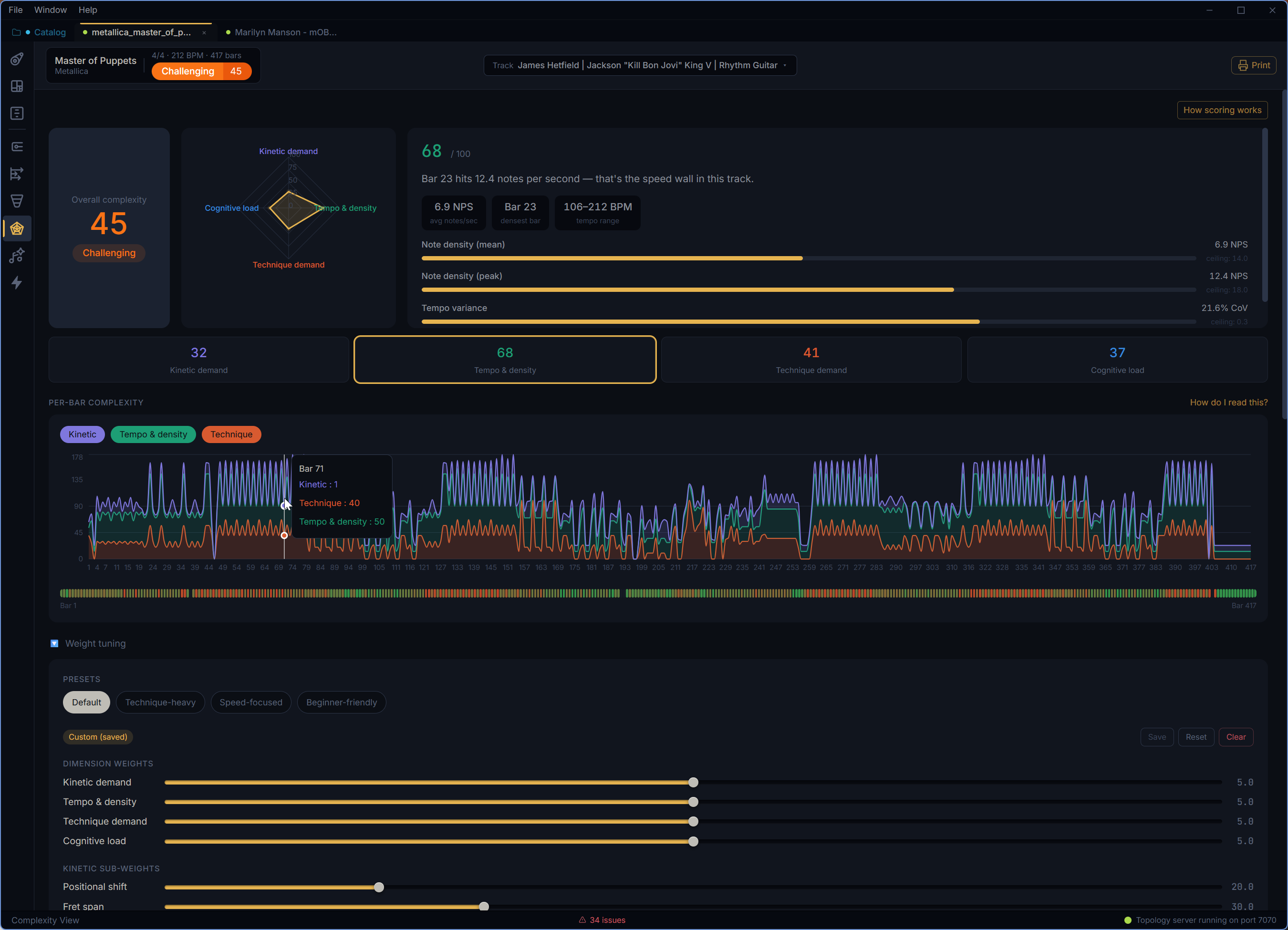
Measure what makes a passage difficult
Complexity View breaks the track into kinetic demand, tempo density, technique demand, and cognitive load, then lets you tune the weighting to match the kind of difficulty you care about.
- ✓ Overall complexity tier plus four-dimensional radar chart
- ✓ Clickable dimension cards with detailed sub-score explanations
- ✓ Per-bar complexity curve with heatstrip for finding spikes
- ✓ Weight presets, custom sliders, before-and-after recalculation, and saved scoring config
- ✓ Section complexity breakdown with confidence filters
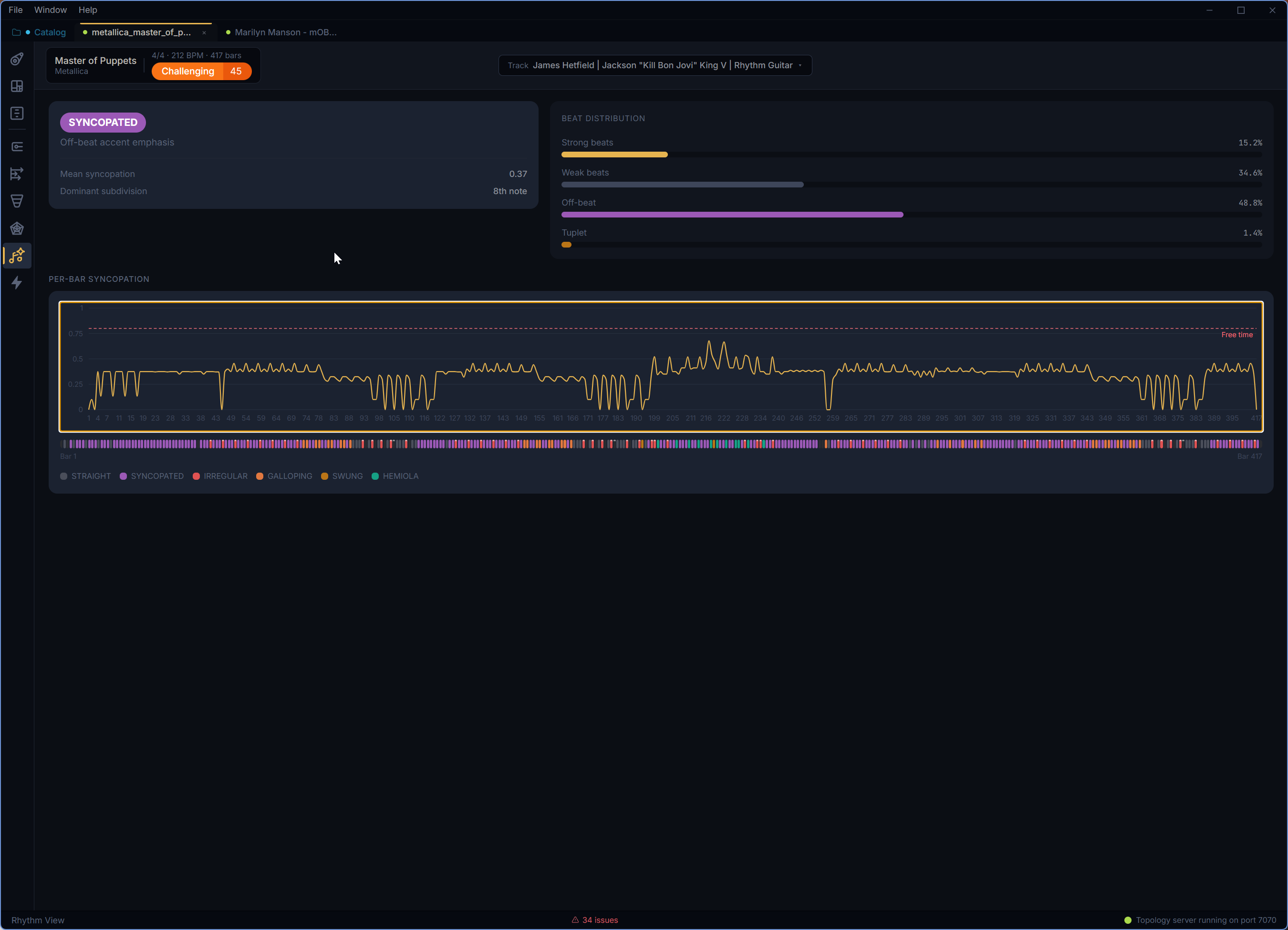
Understand the rhythmic personality of the track
Rhythm View summarizes how the part sits against the beat, then shows where syncopation, tuplets, mixed meter, and character changes happen bar by bar.
- ✓ Track-level rhythmic character such as straight, syncopated, swung, galloping, or irregular
- ✓ Strong-beat, weak-beat, off-beat, and tuplet ratio bars
- ✓ Dominant subdivision and mean syncopation metrics
- ✓ Per-bar syncopation curve with character heatstrip
- ✓ Mixed-meter flags surfaced from the rhythmic profile
Read the feel of the riff, not just the notes
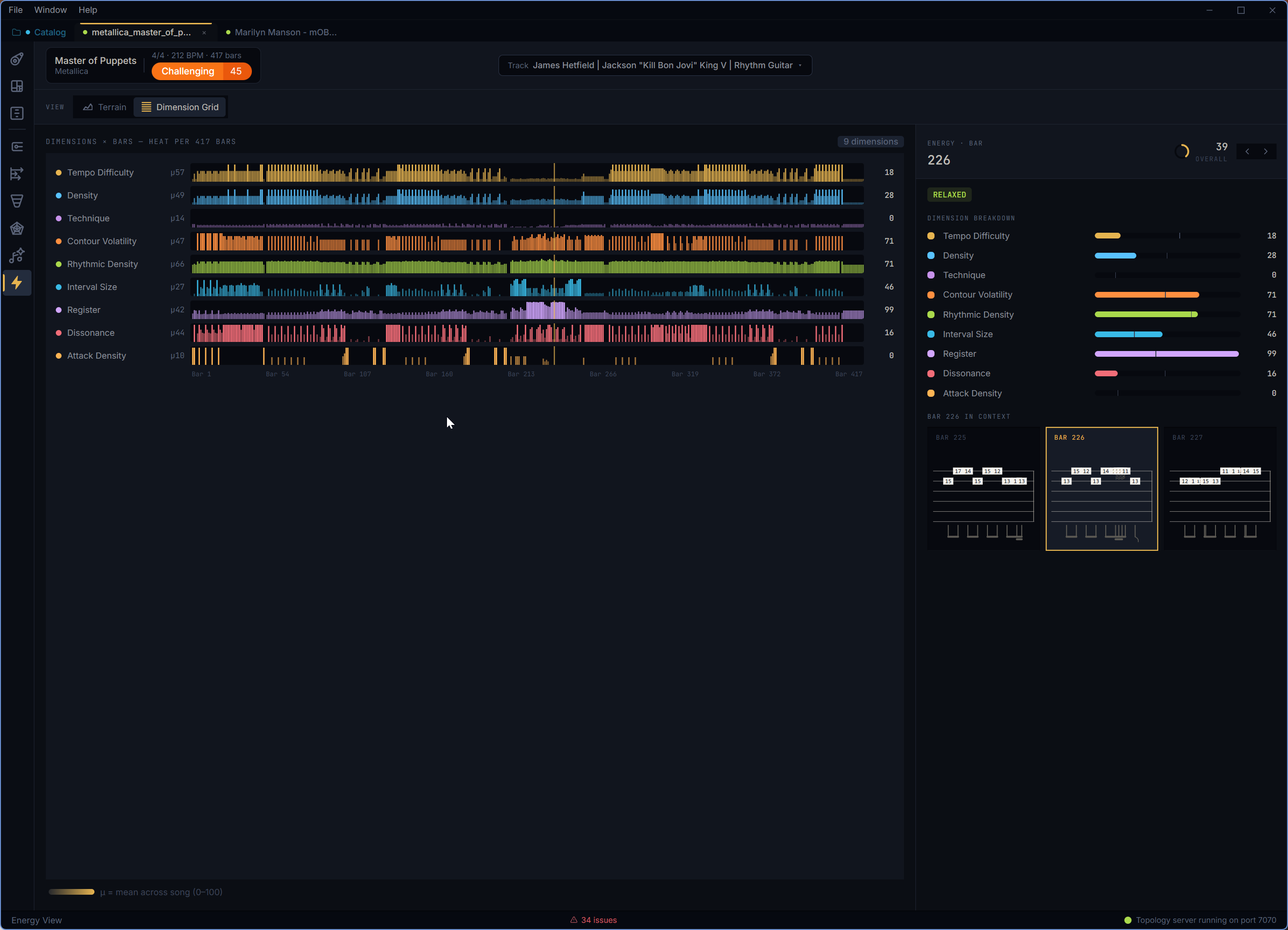
Energy View turns each bar and pattern into a nine-dimension signature, so density, contour, register, dissonance, attack, and technique can be compared as musical shape.
- ✓ Terrain and dimension-grid subviews for the same energy data
- ✓ Nine dimensions including density, rhythmic density, register, contour, interval size, dissonance, technique, attack, and tempo-adjusted difficulty
- ✓ Track and pattern labels such as heavy, frantic, smooth, jagged, tense, and relaxed
- ✓ Overlay toggles for density, technique density, and tempo-adjusted difficulty
- ✓ Bar detail pane with previous/next navigation
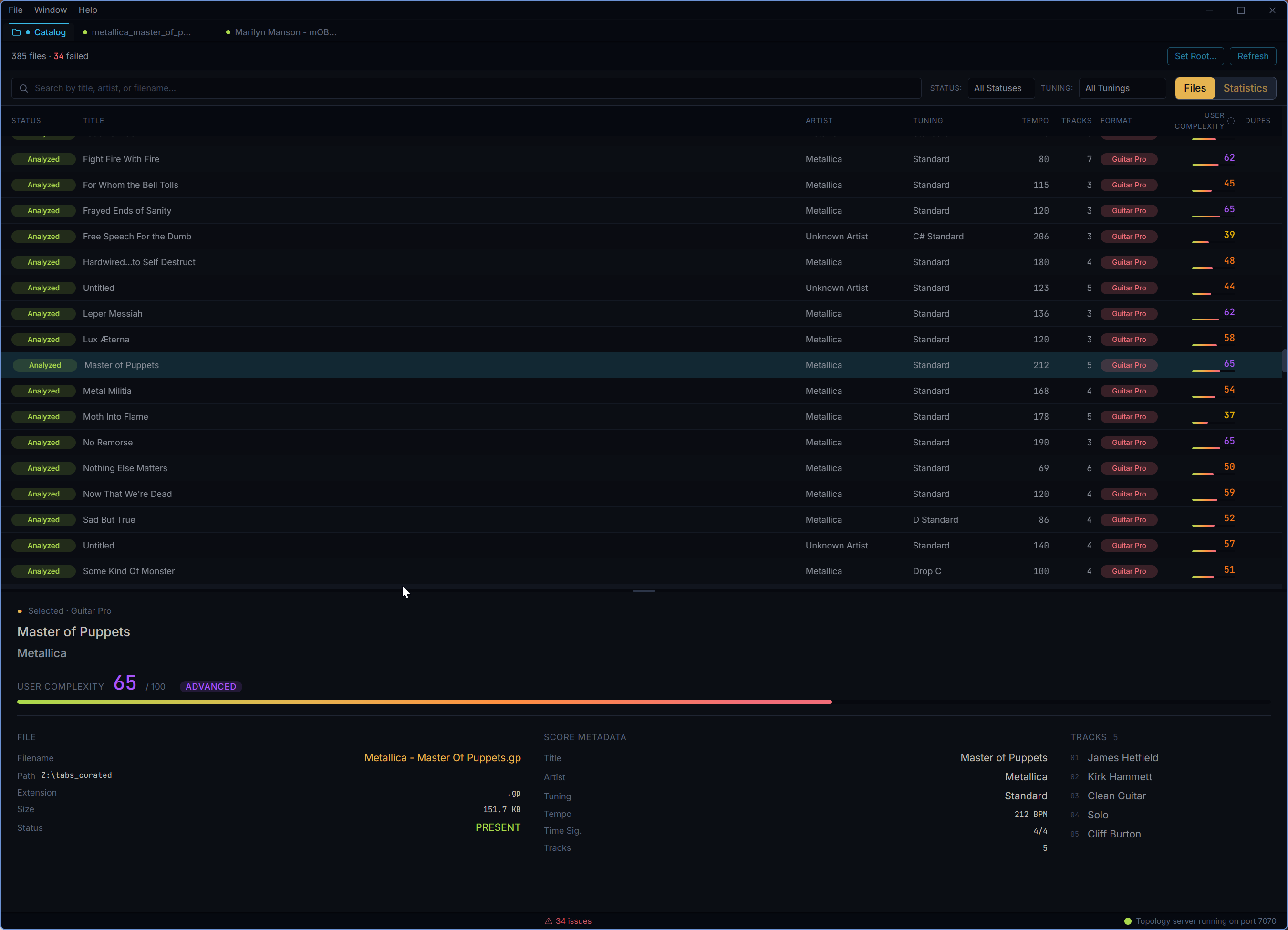
Turn a folder of tabs into a searchable library
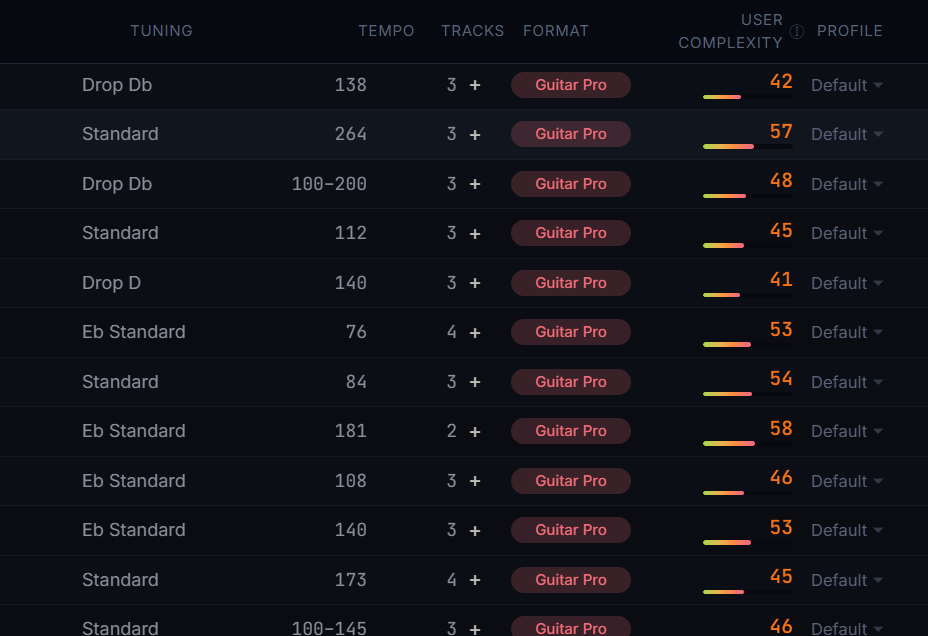
The catalog workspace indexes supported tablature files through the Topology Analysis Engine, tracks scan status, and lets you open analyzed scores straight back into the workspace.
- ✓ Catalog root selection with scan progress from the Topology Analysis Engine
- ✓ Search, filters, sortable rows, and status badges for indexed files
- ✓ Entry states for analyzed, partial, error, missing, and fingerprinted files
- ✓ Double-click an available entry to open it for analysis
- ✓ Resizable bottom detail pane for selected file metadata
Compare an entire library, not just one song
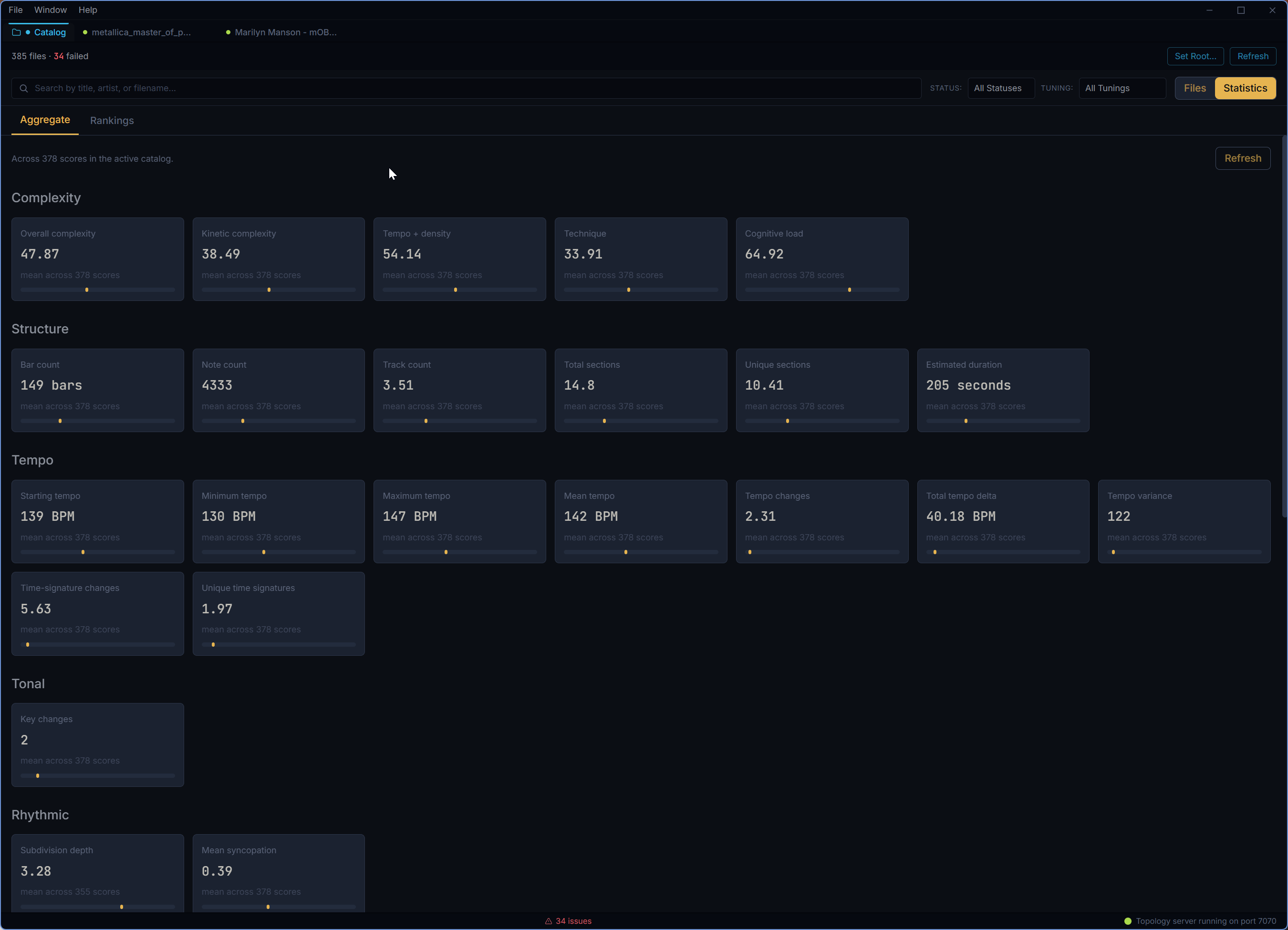
Statistics mode aggregates dozens of dimensions across the catalog and ranks files by top and bottom values, turning a pile of tabs into a map of what your library contains.
- ✓ Aggregate statistics across 54 catalog dimensions
- ✓ Top-10 and bottom-10 rankings per dimension
- ✓ Dimension categories for complexity, rhythm, tonal, picking, and energy data
- ✓ Degenerate-dimension and tie-band handling for cleaner comparisons
- ✓ Catalog scores update when saved complexity weights change
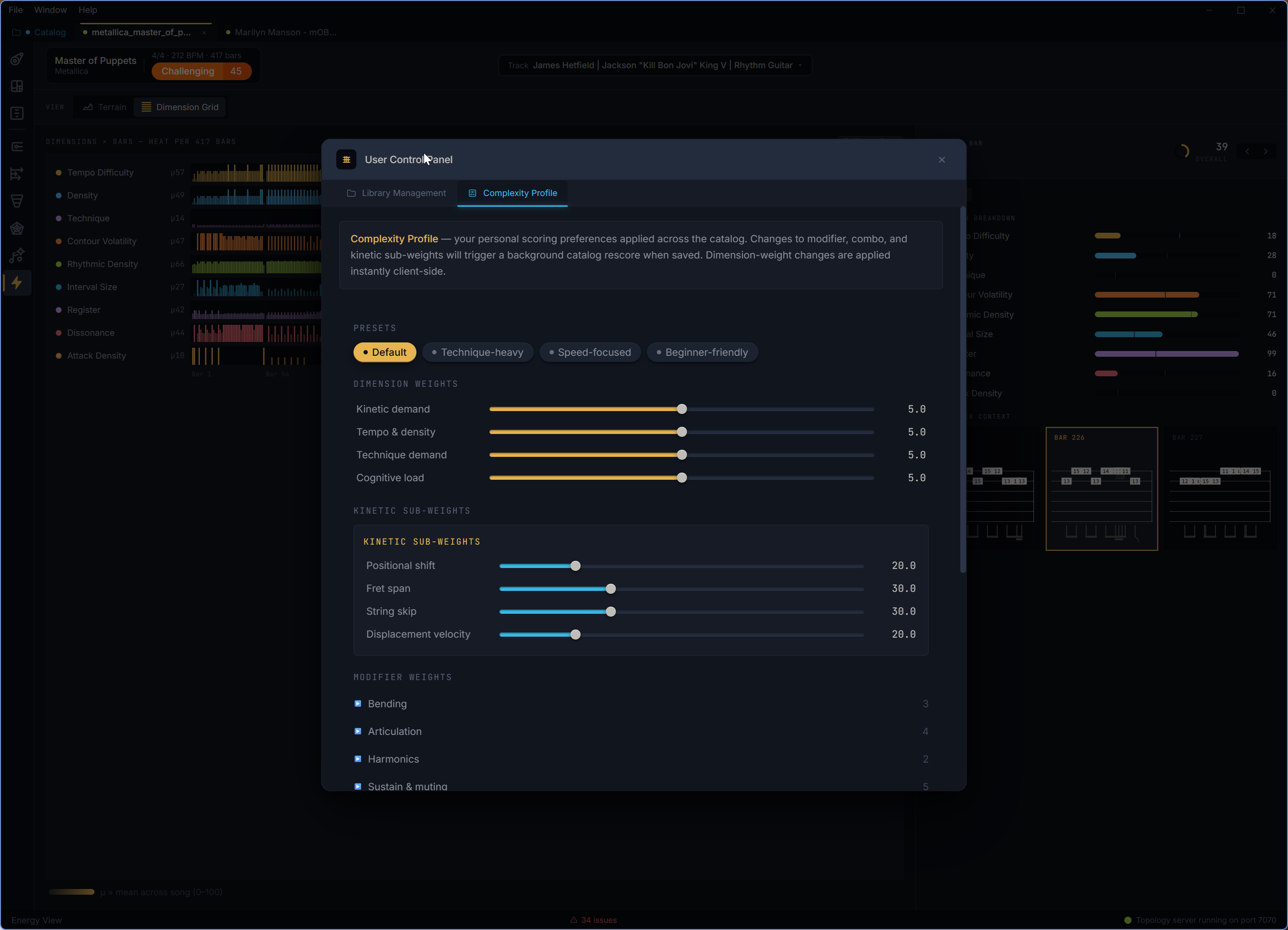
Keep library and scoring preferences under your control
The control panel centralizes catalog management and complexity scoring preferences, including saved weights that can immediately re-rank the catalog without a full backend re-analysis.
- ✓ Manage the catalog root and library scan settings
- ✓ Edit and save complexity profile weights
- ✓ Persist scoring preferences across sessions
- ✓ Trigger catalog re-scoring when relevant weight changes require it
- ✓ Use the same scoring model in Complexity View and catalog rankings
Serious analysis under the hood
RiffAtlas reads Guitar Pro data directly, runs structural pattern discovery, section detection, tonal analysis, rhythmic profiling, complexity scoring, energy signatures, picking analysis, and catalog aggregation, then turns that data into views you can actually practice from.
Pattern Relationships
Flags identical, transposed, rhythmic-variant, motif-reuse, and near-match relationships so variants do not disappear into noise.
Complexity Profiling
Scores kinetic demand, tempo density, technique demand, and cognitive load with user-tunable weights.
Rhythm & Energy
Combines syncopation, beat placement, subdivision, density, contour, register, dissonance, attack, and technique into readable profiles.
Library-Scale Cataloging
Indexes supported tab files, tracks analysis status, and aggregates dimensions across your collection.
AI & Practice Bridge
Uses deterministic score facts as source material for optional AI summaries, difficulty explanations, and practice-plan recommendations.
Cross-Track Relationships
Tracks ensemble relationships like doubling, harmonic intervals, rhythmic lock, counterpoint, and bass-guitar interaction.
Four steps from file to focused practice
Local-first analysis, optional AI, and practice tools that stay tied to the bars in your score.
Open a file or catalog
Open one score or scan a whole folder of Guitar Pro and MusicXML tabs into a searchable local library.
Topology analyzes
The engine extracts patterns, sections, rhythm, harmony, energy, cross-track relationships, percussion data, and catalog metrics.
Explore or ask for help
Move through deterministic views, open optional BYOK AI summaries, or jump straight into a practice sprint.
Play, loop, and track
Use count-ins, loops, click or drum context, timed sessions, and history views to keep practice moving.
Works with your files
Open modern and legacy Guitar Pro files directly, or bring in MusicXML when that is the format you have.
Got a library of legacy tabs? They just work. RiffAtlas runs locally on your machine, and optional AI features use your configured provider rather than uploading your library to a RiffAtlas cloud.
Frequently Asked Questions
The short answers. For the longer story, read how RiffAtlas came to be.
What is RiffAtlas?
RiffAtlas is a desktop application for analyzing Guitar Pro scores and turning them into usable practice context. It maps repeating patterns, sections, rhythm, complexity, energy, fretboard motion, catalog stats, cross-track relationships, and optional AI-generated practice guidance.
What tabs does RiffAtlas support?
RiffAtlas works with native Guitar Pro 7 and 8 files (.gp), Guitar Pro 6 files (.gpx), legacy Guitar Pro 3, 4, and 5 files (.gp3, .gp4, .gp5), as well as MusicXML exports (.xml and .musicxml). We recommend using native Guitar Pro files when possible because they preserve the richest source data.
How does it work?
RiffAtlas sends each file to the local Topology engine, which parses the Guitar Pro data and builds a structural profile of the score: repeated patterns, near matches, section boundaries, tonal context, rhythm, fretboard movement, complexity, energy, picking demands, percussion tracks, score facts, and cross-track relationships. The desktop app then turns that analysis into purpose-built views for reading, comparing, prioritizing, playing, and practicing the score.
Does the AI feature upload my files to RiffAtlas?
No RiffAtlas cloud account is involved. AI is optional and bring-your-own-key: you choose a supported hosted provider or local OpenAI-compatible model. RiffAtlas stores configuration locally, sends only the analysis payload needed for the feature, and keeps deterministic analysis available without AI.
Who is this for?
Anyone who has stared at a long tab and wondered where to start. If you learn songs by identifying what repeats, deciding which phrases give the most coverage, comparing parts, looping hard bars, and tracking practice time, RiffAtlas was built for that workflow.
Does it work for every song?
The usefulness depends on the score. A heavily riff-driven track will produce obvious pattern maps; a through-composed progressive piece may show fewer repeats. The quality of the tab matters too: a well-transcribed Guitar Pro file produces better results than a rough export.
What platforms does it run on?
RiffAtlas is a desktop application for Windows, macOS, and Linux. No web or mobile versions are planned for v1.x.
What will it cost?
RiffAtlas will be a one-time purchase in the $39-$49 range. One license, one user, valid for all v1.x releases. No subscriptions.
When will it be released?
The core analysis engine is proven and working. The app is in heavy testing and polish: validating real-world tabs, stabilizing expanded AI and practice workflows, and preparing the desktop experience for public release.
What's on the roadmap beyond the initial v1.0 release?
The current roadmap is focused on polishing the expanded desktop workflow: deeper practice-mode history, richer playback controls, stronger ensemble analysis, better screenshot-ready UI surfaces, and export/reporting improvements. Cross-track analysis and section detection are already part of the current app surface.
Be first to try RiffAtlas
We're building toward a public release. Drop your email and we'll let you know when early access opens. No spam. No selling. Join the hundreds of musicians already on the list!
One email when we launch. That's it.